XBOX ONE Gamepad drift on new analog and manual resistance adjustment
Replacing analogs requires experience and the right equipment!
● Issue Description
The analog stick consists of two potentiometers — colored components with three pins that can be detached from the housing. Each has a total resistance of 10 kΩ with a tolerance of 20%. Both potentiometers act as voltage dividers. If any deviation appears after replacing the analog stick, it indicates that a component with different electrical characteristics has been installed. The ideal solution is to recalibrate the controller. Simplest approach is to keep soldering the potentiometers (the three-pin parts) until proper operation is achieved, or to measure the old potentiometer first and select a new one with as close parameters as possible.
● Repair Steps
The solder pads on the motherboard are very delicate and can easily come off — be careful!
- Set the hot air station to 420°C.
- Set the soldering iron to 420°C as well.
- Apply flux and add a bit of fresh solder to all pins.
- Heat the area evenly until the solder on all legs becomes fully melted and shiny.
- Carefully remove the old analog stick.
- Clean the pads with flux and solder wick if needed.
- Place the new analog stick, apply flux again, and solder all pins gently.
● "Manual" resistance adjustment
The Xbox Series gamepad can be calibrated using an Xbox One or Xbox Series console. However, if you don’t have access to either of them, please read the information below.
The Xbox One gamepad cannot be calibrated on either a PC or the Xbox One console, which is why some technicians use a “manual” resistance adjustment (photo) to reduce drift on a new analog stick. However, this must be done with great care — applying too much correction may prevent the stick from reaching its full range of motion. Personally, I only use this method when I need a very small adjustment, such as –0.05 or –0.02.
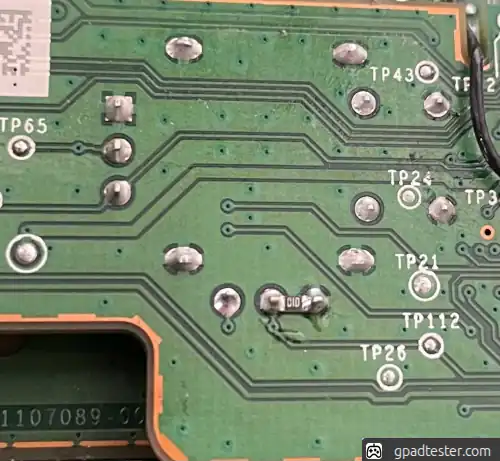
| Resistor Value | Resistance Adjustment |
|---|---|
| 43 KΩ | −0.15 |
| 51 KΩ | −0.11 |
| 100 KΩ | −0.05 |
| 200 KΩ | −0.02 |